SRD Online Application 2026: How to Apply for the SASSA R370 Grant
The SRD online application for South Africa’s R370 relief payment starts on SASSA’s official website. This independent guide explains where to apply, who qualifies and what to check before you submit. Already applied and looking for your monthly result? Use our SASSA status check for SRD R370 guide instead.
You can begin your SASSA SRD application online without paying an agent. SASSA reviews applications against eligibility and identity-verification rules, so submitting a form does not guarantee approval or an immediate payment.
Official government portal: srd.sassa.gov.za (free application service).
- Monthly relief amount
- R370, if approved
- Applicant age
- 18 to 59 years
- Current funded period
- Through 31 March 2027
Independent information: This website is not SASSA, the Department of Social Development or a government application service. We do not collect ID numbers, OTPs, banking details or application submissions.
Where to Apply for the SASSA SRD R370 Grant in 2026
Use https://srd.sassa.gov.za/ to begin an SRD online application for the R370 grant. This is the official portal identified in SASSA’s 2026 information booklet and government notices. You should see separate entry routes for South African ID holders and for people applying with qualifying asylum seeker or special permit details.
Use the official SASSA SRD application portal
Open the government portal directly, read the declaration and consent terms, and select the applicant category that matches your documents. The SRD online application process then asks for relevant personal, contact and financial details. The step-by-step application walkthrough is covered later in this guide, after the eligibility and preparation sections.
Check the address bar carefully: the official domain is srd.sassa.gov.za. Do not enter a South African ID number, bank PIN or one-time password into a website that only looks like the government portal. If something seems suspicious, close that page and type the official address yourself.
Choose the correct applicant route
The portal separates applicants by identification type. Choosing the correct route matters because SASSA must be able to match your details against the appropriate official records.
Route 1South African ID holders
Choose this route if you have a valid South African ID number. Enter your own details as they appear on official records and use a cellphone number that belongs to you.
Route 2Asylum seekers and special permit holders
Choose the dedicated route if you hold a qualifying asylum seeker file number or a valid permit under an eligible dispensation. Follow the identification requirements shown by the government portal.
If you are uncertain about your status or identification category, check the current portal instructions before submitting anything. Do not guess an ID type simply to move past an application screen.
Is there an SRD application form to download?
For the COVID-19 R370 SRD programme, the SRD online application process is entirely electronic. You complete the form through the official online service rather than downloading a printable PDF form from an unofficial website. SASSA’s SRD portal explains that ordinary applicants provide their information electronically and are not normally required to upload supporting documents at the initial stage. Additional information may still be requested during later screening.
Be careful with search results offering a downloadable “SRD application form” that asks you to send personal details to a private address. An independent guide like this one must not request your application information.
Can you apply using WhatsApp, USSD or a third-party website?
SASSA lists a WhatsApp chatbot among its information and support channels, but that does not mean every chatbot, USSD code or third-party website is a verified R370 application submission route. To avoid confusion, use the official srd.sassa.gov.za portal for your SRD online application. Treat instructions circulating on social media as unverified until confirmed by SASSA.
The SRD application is free. Do not pay someone for guaranteed approval, share an OTP with a stranger or send a banking PIN by message. SASSA has warned about fake websites that imitate the real SRD service.
Who Qualifies for the SRD R370 Grant?
The R370 SRD programme is intended for people who cannot meet their basic needs and satisfy SASSA’s eligibility checks. Your age, residence, identification or permit status, financial means and other benefits all matter. Eligibility for an SRD online application is assessed by SASSA, not by this website.
Age, residence and acceptable identification
Applicants must be at least 18 and younger than 60, and must reside within South Africa. SASSA’s 2026 booklet identifies South African citizens, permanent residents, recognised refugees, people with valid qualifying Angolan, Lesotho or Zimbabwean special permits, and eligible asylum seekers with a valid Section 22 permit or visa. Identification must be verifiable through the relevant official systems.
Being unemployed does not by itself guarantee approval. Applicants must also meet the programme’s financial and other conditions.
Income, other grants and financial screening
SASSA considers whether the person has insufficient means, receives another social grant in their own right, or has other financial support or relevant benefits that make them ineligible. The SRD portal also describes UIF-related restrictions. Banking and other official data may be checked to assess eligibility; do not assume that submitting the SRD online application means you will automatically receive R370.
Because screening requirements can be updated, check the declaration and consent information shown on the official application portal rather than relying on an old income threshold copied from another website.
2026 eligibility checklist at a glance
| Eligibility factor | What SASSA checks |
|---|---|
| Age | 18 years or older but not yet 60. |
| Residence | Living within South Africa. |
| Status | Qualifying citizenship, residence, refugee, asylum seeker or special permit status. |
| Financial means | Insufficient means under the current SRD means-test rules. |
| Other benefits | No disqualifying personal grant or other incompatible support, as assessed under SRD rules. |
| State care | Not being maintained in a state-funded institution. |
| Verification | Identity information must match official records; new applicants must complete facial eKYC before approval. |
Is the R370 SRD grant continuing through 2027?
Yes. Government confirmed funding for the R370-a-month programme from 1 April 2026 through 31 March 2027, subject to applicants continuing to qualify. This confirms the current funded period; it is not an announcement of permanent payments, and it does not guarantee approval for every month.
After applying, the important next steps are to complete any required identity verification and follow your individual result through the official system. Later sections of this article explain how to prepare your details and submit the SRD online application safely.
What You Need Before Starting Your SRD Application
Preparing a few accurate details before you start can make your SRD online application easier to complete. SASSA collects the information electronically on its official portal, so this website does not provide an application form or ask you to enter any personal details here.
Your identification, cellphone and OTP access
For the South African ID-holder route, have your 13-digit South African ID number available and check that your name and surname match your official identity record. Applicants using the asylum-seeker or special-permit route should have their valid file number or applicable permit information available and follow that specific route on SASSA’s website.
Use an active cellphone number registered in your own name that you can access. SASSA uses this number to communicate with applicants and send verification instructions. You may need an SMS one-time PIN (OTP) during the process; never share that code with an agent, stranger or website that is not the official SASSA portal.
Banking and employment details to have ready
SASSA’s online process asks applicants to confirm personal information, employment or lifestyle circumstances, and banking information. Be ready to answer the questions honestly. If you are asked to provide a bank account, it should be an account in your own name; another person’s account may fail verification and delay payment.
Do not assume that every payment method mentioned in an old tutorial remains available. If you do not have a suitable account, review the options currently offered on the official portal or ask SASSA for guidance rather than entering somebody else’s banking details.
Do you need to download an SRD application form?
The standard SRD online application is submitted through SASSA’s online service, not through a printable SRD application form hosted on this site. SASSA states that applicants submit their information electronically and do not normally need to upload supporting documents during the standard online application.
That does not mean extra checks are impossible: SASSA can request additional information or verification in particular cases. The requirements for other social grants, such as an Older Persons Grant, are different, so do not use a general social-grant document checklist as the R370 online application checklist.
Quick preparation checklist before applying
Use your own valid ID or qualifying permit information, with names matching the official record.
Keep the registered number active so you can receive SMS verification and future notices.
Be ready to answer employment and support questions; use only your own bank account if requested.
Open the government address directly and keep OTPs, bank PINs and identity information private.
SASSA’s 2026 guidance says new applicants must complete facial biometric identity verification (eKYC) before an SRD online application can be approved. This is a separate verification requirement, not proof that submitting the form guarantees payment. The dedicated eKYC section later in this guide explains what to do when SASSA requests it.
How to Apply for SRD R370 Online: Step by Step
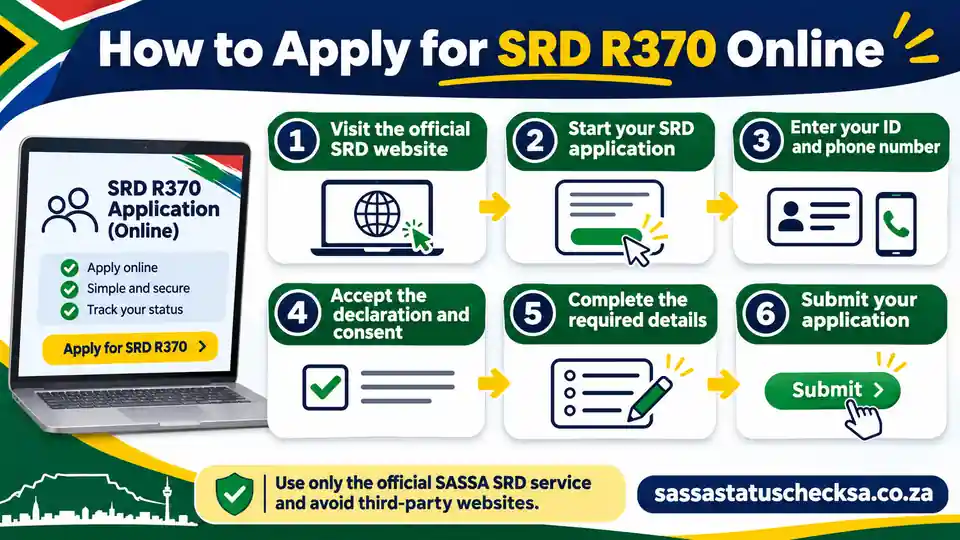
To apply for the SRD grant, go directly to the official SASSA SRD website (srd.sassa.gov.za). The six steps below describe the SRD online application process and the checks you can expect; button labels and the order of some screens may change as SASSA updates its portal. Follow the instructions you actually see on the government website.
Six steps for an SRD R370 application
- Open the genuine government portal.
Type srd.sassa.gov.za in your browser. Check the address before selecting an application option. The SRD online application is free; do not use a lookalike site offering guaranteed approval.
- Select the correct applicant category.
Choose the route for South African ID holders or for asylum seekers and special permit holders, whichever applies to you. The information requested can differ by category.
- Provide and verify your cellphone number.
Enter your own active number when prompted and complete the SMS verification using the one-time PIN sent to you. Keep the PIN private. If the SMS does not arrive, use the portal’s displayed instructions rather than handing your code to someone else.
- Read the declaration and complete your details.
Read and accept the official declaration and consent if you agree. Supply the requested identity, contact, employment and other eligibility information accurately. SASSA uses these details for checks; do not guess or give information on another person’s behalf.
- Follow the payment-information prompts.
Provide or confirm the banking details or payment information the current portal requests. If entering a bank account, ensure it belongs to you. Do not send banking PINs, card security codes or OTPs to an unofficial contact.
- Review, submit and follow verification instructions.
Check the details before your final submission, then keep any confirmation or reference shown or sent to you. If SASSA requests facial biometric verification, complete it through the authentic official process: the 2026 rules require eKYC for new applicants before approval. Submission alone is not an approval or an immediate payday.
There is no application form to complete on this independent guide. Your identity details, mobile number, banking information and OTP must be entered only into SASSA’s genuine service. If a screen looks different from the steps above, rely on the current government portal rather than forcing an outdated sequence.
What is an application ID for SASSA, and is it the six-digit code?
An application ID or reference number is an identifier that the SRD online application system may show after submission or use in communication with an applicant. An OTP is different: it is a temporary code used to confirm access to a cellphone or a particular action. Do not assume the SMS code is your permanent application reference.
Some older SRD instructions show a six-digit application ID for certain applicant routes. That does not establish that every applicant in 2026 receives the same six-digit reference format. If the current portal displays an application ID, save it privately exactly as shown. If you are looking for a reference and cannot find one, check the official portal’s instructions or ask SASSA for help at 0800 60 10 11; we cannot retrieve an application ID here.
What if no confirmation appears after you submit?
Do not treat a blank screen, interrupted connection or missing SMS as proof of acceptance or rejection. Check whether the official service shows a saved application or gives a further action; avoid sending multiple hurried applications because a screen failed to load. If you cannot establish whether the submission was received, contact SASSA using its published channels.
Your application can still require identity checks and monthly eligibility assessment after submission. The later sections explain facial eKYC, application outcomes and troubleshooting in more detail; this application walkthrough does not replace those checks.
SRD Facial Biometric Verification (eKYC) and OTP Security
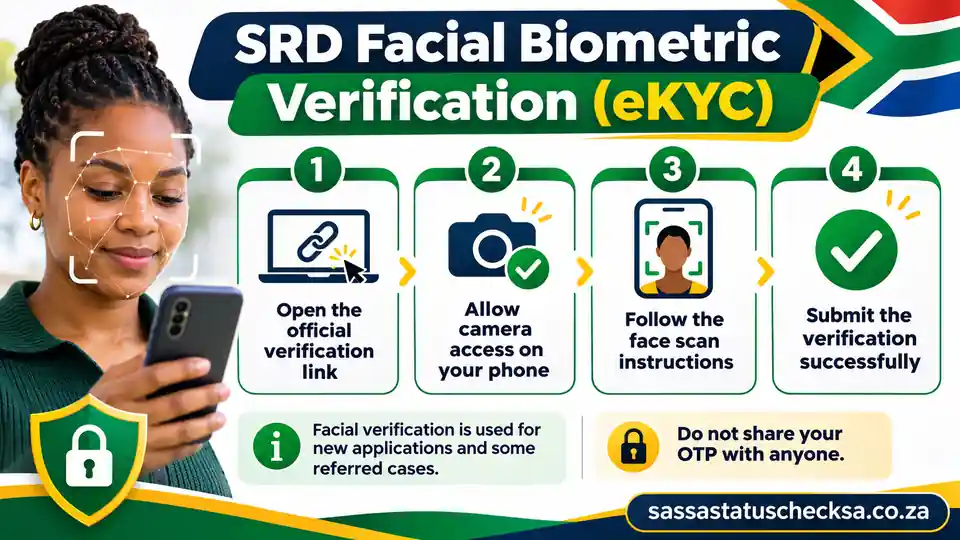
SRD facial biometric verification, also called eKYC (electronic Know Your Customer verification), helps SASSA confirm that the person making an SRD online application matches the identity information in official records. According to SASSA’s 2026 guidance, all new SRD applicants must complete facial eKYC before their application can be approved. It is an identity-security step, not a guarantee that the person meets the grant’s income or other eligibility requirements.
Why SASSA asks for facial verification
Biometric checks help prevent someone from submitting or controlling an SRD online application using another person’s identity. SASSA may compare identity information through official systems, including the Department of Home Affairs. The verification is part of the official SRD process; it is not a feature of this independent website.
People sometimes confuse eKYC with the temporary SMS OTP they use when accessing an application. These are not the same. An OTP helps confirm access to a phone or an action, while facial eKYC is designed to establish identity. Passing one of those steps does not automatically complete the other.
SASSA’s 2026 booklet specifically lists new SRD applicants, people whose status is referred, applicants who need to change their cellphone number, and people with a status of approved but not paid. Follow the instructions for your own case; not everyone sees identical screens or has to repeat facial verification every month.
How to complete an official eKYC request safely
Use the current instructions from SASSA’s official SRD portal (srd.sassa.gov.za) whenever identity verification is required. These practical steps are a safety checklist, not a promise that every device shows the same menus or buttons.
- Start at the authentic website.
Open srd.sassa.gov.za in your browser and choose the relevant official applicant or verification route. Do not begin with a random link shared in a social-media comment or a paid application service.
- Review the request and protect your phone.
Read any instructions shown by SASSA. If you receive a message asking you to verify, check that it relates to an action or request within the official service. Use your own registered cellphone number and never disclose an OTP to someone else.
- Complete the identity step as directed.
If the genuine SASSA process opens a facial-verification step, allow camera access only for the official service and follow its on-screen guidance. A clear view of your face and stable connection may help, but exact camera requirements and retry options depend on the system currently in use.
- Check the official result and any next action.
Follow the service’s confirmation or further instructions, then check your SRD result through the official portal when appropriate. A completed selfie check does not mean your grant has already been approved or paid.
Do not upload a selfie, ID photo, banking information or one-time code to this website or to an unfamiliar person who promises faster verification. SASSA applications are free. If you are unsure whether a link or request is genuine, return to srd.sassa.gov.za or contact SASSA directly.
Referred status, approved but not paid, and cellphone changes
The next step depends on the situation SASSA identifies. A referred status is not the same as an official decision to decline an SRD online application: it signals that further identity or case review may be required. SASSA’s 2026 booklet describes requesting the appropriate verification link through its portal for referred and approved-but-unpaid cases.
Referred status
Visit the official SRD portal, check the instructions associated with your result, and request the identity-verification link or assistance as directed. Contact SASSA if the issue cannot be resolved in the portal.
Approved but not paid
The 2026 booklet directs affected applicants to complete facial recognition. Also check whether any banking verification or payday information is still outstanding; approval alone is not proof a transfer has been made.
Changing your cellphone number
SASSA requires facial recognition when an applicant changes the registered cellphone number. Make the change through its authentic service; do not ask an unofficial agent to take over the account or receive OTPs.
No smartphone or mobile data? How to get help
If you cannot complete facial verification because you lack a smartphone, laptop or data, ask your nearest SASSA local office for biometric-verification assistance. In its 27 January 2026 statement, SASSA said offices can help using official kiosks, laptops or guest Wi-Fi. Contact the office or SASSA’s toll-free line before travelling if you need to confirm available assistance and opening times.
Office assistance for eKYC should not be mistaken for a separate general paper application route for the R370 SRD programme. The standard SRD online application remains an electronic process. Avoid paying a third party to complete your facial verification.
What Happens After You Submit an SRD Application?
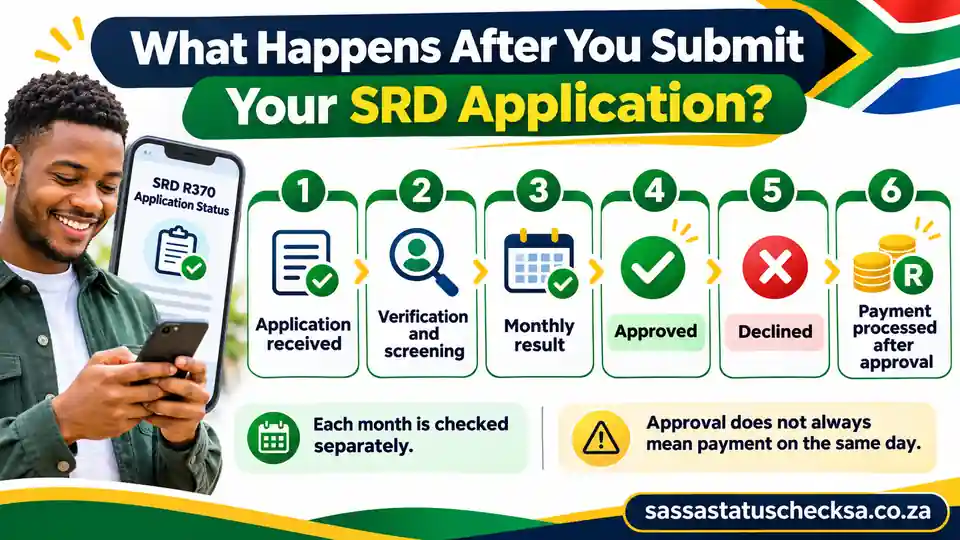
Submitting your SRD online application is the start of SASSA’s assessment, not an approval notice. The agency must evaluate your details, complete any necessary identity checks and assess whether you qualify for a particular month. Since SRD eligibility can be checked monthly, your decision or payment information may change from one month to the next.
From submitted application to monthly assessment
Think of the process as four separate stages. The labels shown in your own portal may be different, and a request for more information can occur between stages:
- 1. Application receivedYour SRD online application information has been submitted or recorded through the official service. This is not a decision.
- 2. Identity and eligibility checksSASSA may check your identity, facial verification, financial means and other qualifying conditions.
- 3. Monthly decisionThe result for a particular month may show pending, approved, declined or a request for further verification.
- 4. Payment processingFor an approved month, payment still depends on completed bank/payment checks and the individual payday shown by SASSA.
An SRD online application record, a successful OTP check, completion of eKYC and a monthly approval are different milestones. There is no single universal SRD R370 payment date for everyone, and a positive result does not guarantee that the money appears immediately.
Common application and monthly status messages explained
The following examples help you interpret a result without assuming that every account shows the exact same wording. Always rely on the explanation and instructions displayed by SASSA for your own month.
| Possible message | What it generally means | What you can do |
|---|---|---|
| Application complete / received | The system has a submitted application or application record. | Keep the correct cellphone active and check monthly results through SASSA; do not confuse receipt with approval. |
| Pending | Checks for the selected period have not finished or a decision is not yet available. | Check again through the official service; respond if SASSA asks you to verify identity or details. |
| Referred / verification required | Further identity or case verification may be needed. | Follow the official portal’s verification instructions and contact SASSA if needed; do not assume you have been declined. |
| Approved | You have a positive result for the month shown, subject to payment processing. | Look for any available payday, bank-detail notice or verification request; do not assume instant payment. |
| Approved but not paid / no payday shown | An approved result exists but the transfer or payment-date information is not yet complete. | Check official payment and facial-verification instructions, including the 2026 booklet guidance; seek help if the issue persists. |
| Bank details pending | The system may need payment information or bank verification. | Follow the official portal’s secure payment-detail process; use an account in your own name where one is required. |
| Declined | SASSA has recorded a negative decision for the month shown. | Read the stated reason and use the official Department of Social Development appeals route if you believe the decision is wrong. |
This table is an explanatory guide, not a live SASSA account lookup. The wording, checks and options shown in the official service can change.
How to check your SRD application result each month
Use SASSA’s official SRD status-check service (srd.sassa.gov.za/sc19/status) to view the result and any payday information available for your own application. If that specific route has changed, begin from the official SRD website (srd.sassa.gov.za) and find its current status-check option. Check the month shown in the result: one month’s approval does not mean every later month is automatically approved.
If you see a request to verify your identity, complete that requirement through the authentic government process rather than waiting for the SRD online application status to change on its own. If the status is still pending, allow time for official checks and follow the agency’s instructions; this website cannot view, update or accelerate your application.
What if your application is declined or an approved payment is missing?
If a particular month is declined, read SASSA’s stated reason first. Official guidance allows appeals through the Department of Social Development’s SRD appeals process; because decisions are monthly, an appeal may be needed for each month you dispute. Check the current appeals route and submission instructions on the genuine official SRD government portal (srd.sassa.gov.za). Do not send an appeal or sensitive documents through an unverified third-party website.
If you believe a particular declined decision was wrong, our SASSA appeal guide explains the filing steps, deadline and how to check the appeal outcome.
If a month is approved but unpaid, check for bank-detail, individual payday or biometric-verification instructions before assuming a transfer is overdue. SASSA’s 2026 booklet specifically advises facial verification for approved-but-not-paid cases. Use an account in your own name if bank details are requested; inaccurate or changed details can delay verification. There is no fixed SRD payment date shared by all applicants.
Common SRD Application Problems and Safe Fixes
Most SRD application problems come down to a missing verification message, details that do not match official records, an identity check that needs attention, or a payment method still being verified. Before starting another SRD online application, identify what SASSA’s genuine service is asking you to do. An application that says pending is not automatically broken, and a referred result is not the same as a final decline.
No OTP or SMS, an old cellphone number, or a failed submission
If an expected OTP or SRD online application message does not arrive, first confirm that the phone number entered in the official process is your own registered, working number. Check reception, SMS availability and whether the portal has shown a request to retry. A slow network or a timed-out screen is not proof that SASSA has received, rejected or approved an application.
Do not keep resubmitting forms without checking the official application record. Return to SASSA’s authentic SRD portal (srd.sassa.gov.za), use its current status or account instructions, and contact SASSA when you cannot tell whether the earlier submission was saved. Never give a stranger your ID details or OTP in exchange for a promised confirmation SMS.
If your old SIM is lost, your phone number has changed, or you can no longer receive codes, use the contact-number recovery/change instructions provided by SASSA. The 2026 SASSA booklet states that an SRD cellphone-number change requires facial recognition verification. There is no safe unofficial OTP bypass, and this site cannot change your number.
Wrong personal details, duplicate records or an identity mismatch
SASSA checks applicant information against government and other eligibility records. If your names, ID or qualifying permit information are inconsistent, follow the verification or correction route that the official service identifies. Do not guess a different identity number, create competing applications under someone else’s details, or pay an agent to edit a government record.
When the system says an SRD online application already exists or an ID has been used, do not assume that simply entering the same details repeatedly will solve it. Check for an existing legitimate application and contact SASSA if you suspect that your personal details were used without permission. The agency has previously warned about fraudulent SRD applications and advises affected applicants to use its official support channels.
Pending, referred, biometric verification, and bank-related delays
Different messages point to different actions. A pending month usually calls for checking SASSA’s latest assessment result, not cancelling. A referred message may require identity verification or case assistance. If the official portal asks for facial eKYC, follow that secure process; completing an identity check is not a guarantee of approval.
Likewise, an approved but unpaid case may involve a verification requirement, the bank account or payment-processing information. SASSA’s 2026 booklet specifically highlights facial verification for this category, while the agency’s banking guidance stresses that payment details must belong to the applicant. Do not assume there is one universal R370 payday or that a new bank submission is processed instantly.
| What you see | What to check | Safe next action |
|---|---|---|
| No SMS or OTP | Working registered number, signal, and any official retry notice. | Use the current SASSA verification instructions; contact SASSA if access is lost. |
| Form timed out or no confirmation | Whether the official service recorded the application. | Check the legitimate application route before submitting again. |
| Wrong name / ID details | Match to your official identity or valid permit record. | Use the correction or identity-verification process SASSA directs. |
| Application already exists | Whether it is your genuine existing record or possible misuse. | Check the record safely; contact SASSA if you suspect identity misuse. |
| Pending result | The month selected and any outstanding verification instruction. | Follow the authentic status information; do not cancel just because checks are unfinished. |
| Referred / eKYC required | Official identity-verification request. | Complete the government verification step or seek SASSA assistance. |
| Approved, no payment yet | Verification, individual payment result, and registered bank details. | Use SASSA’s official guidance; no payment date or speed is guaranteed. |
| Declined for a month | That month’s stated reason. | Use the official DSD appeals process if the decision is disputed; do not treat a new application as an appeal. |
The table explains common situations, not exact words that every account will show. Menu labels and next steps on SASSA’s official service may change.
When to contact SASSA and how to avoid application scams
Contact SASSA when your phone is inaccessible, your identity appears to have been used by somebody else, a verification request cannot be completed, or an official instruction is unclear. The published toll-free number is 0800 60 10 11. For suspected grant-related fraud, SASSA’s 2026 booklet also gives the anti-fraud line 0800 701 701.
Type srd.sassa.gov.za directly. Avoid social posts advertising priority applications or unofficial lookup tools.
Never send a one-time PIN, ID photo, facial image or banking PIN to this site, an unknown person or an unverified link.
An application may have different outcomes across months. Read the individual monthly reason or request before acting.
Each contact or bank update may need further checks. Correct genuine mistakes, but avoid unnecessary repeat submissions.
We are an independent information website, not SASSA or an application agent. We cannot look up or repair your account, collect your identity information, approve R370 payments or speed up an application.
Reapplication, Cancellation, Reconfirmation and Banking Updates
Changing your circumstances or payment details is different from starting a new SRD online application. Before you take action, identify whether you want to cancel an existing application, reinstate an earlier cancellation, reapply because SASSA instructs you to, reconfirm existing details, or simply update banking information. These are not interchangeable processes, and doing the wrong one can complicate your case.
How to cancel an SRD application when your circumstances change
If you no longer need the R370 assistance or no longer meet the eligibility requirements, you should keep SASSA informed rather than continuing to present outdated information. A voluntary SRD grant cancellation is a decision to stop the application, not a shortcut for fixing an application that is merely pending, referred or declined for one month.
- Confirm that cancellation is the action you actually need.
Review your current eligibility and the status of the SRD online application through the official service. A disputed declined month normally belongs in the appeals process, not a cancellation.
- Open SASSA’s authentic SRD portal.
Go directly to srd.sassa.gov.za and find the current application cancellation or account-management option, if available for your case. Labels and screens can change.
- Complete only the official identity and confirmation requirements.
Follow the instructions shown by SASSA and review what you are agreeing to. Never give an SMS code to a paid helper or submit it through an unrelated website.
- Verify the updated status.
Use the official service to confirm what happened and retain any confirmation privately. Do not assume that cancellation immediately resolves past disputed months or already-processing payments.
If your result is pending, referred, or approved but awaiting payment, first follow the relevant identity, status or bank-verification guidance. Cancellation may create an unnecessary extra application-management step and is not a guarantee of faster assistance.
Reinstatement versus reapplication: which route applies?
If you previously cancelled your grant and now need help again, SASSA may offer a way to reinstate a cancelled application through the genuine SRD online application system. The agency’s guidance also allows reapplication in applicable cases, including after fraudulent applications have been cancelled. The appropriate route depends on your record and what the current portal or a SASSA official tells you.
Use the official reinstatement route when it is available to your situation. Expect identity and eligibility checks; reinstatement is not an automatic R370 approval or a payment guarantee.
A genuine new SRD online application may be appropriate after a cancelled, closed or otherwise ineligible record, subject to SASSA’s current instructions. Do not create duplicate applications simply because one month is pending or declined.
If you believe a decision for a particular month is incorrect, use the official Department of Social Development appeal route. Reapplication and cancellation do not replace a monthly appeal.
When only your cellphone, screening answers or payment details changed, follow the official update or verification route instead of automatically cancelling and starting over.
SASSA assesses SRD eligibility under the rules in force for the relevant period. Neither reinstatement nor a fresh submission creates an entitlement to missed payments or guarantees the same result as a previous month. If the service does not offer a route for your case, contact SASSA rather than following screenshots from an outdated third-party tutorial.
Do you need to reconfirm or reapply every month?
Monthly assessment is not the same as a monthly reapplication. SASSA may reassess an active SRD case from month to month using updated eligibility information. That does not by itself establish a universal rule that every applicant must submit a new form or press a reconfirmation button every month in 2026.
Sometimes an applicant may receive a genuine instruction to reconfirm application details, complete a screening update, or provide further verification. If that happens, check the notice on the official SRD service and follow its current instructions. If your circumstances have changed, update relevant information truthfully. Do not ignore an authentic SASSA request, and do not respond to an unauthenticated SMS or social-media link requesting private data.
If your result says something like reapplication required or reapplication pending, use the instructions specific to that case. This is different from a standard month’s pending assessment and different again from appealing a declined month. The page you are reading is an explanation, not a live determination of which option your account offers.
Important distinction: a monthly eligibility check can happen without a new application. Complete a reconfirmation, fresh submission or reinstatement only when SASSA’s current instructions for your own case require that action.
How to change SRD banking details or update your cellphone safely
Incorrect, inactive or third-party banking details can delay an approved payment. If you need to change SRD banking details, begin at the official SASSA SRD website, locate its currently available payment-details or account-management guidance, and complete any verification it requests. SASSA says the account should belong to the applicant; another person’s bank account may not verify.
For the separate bank-account update process, ownership rules and verification problems, see our SASSA change banking details guide.
After a genuine update, check for the official verification outcome and your own monthly result. Do not assume the change takes effect instantly or that an approved month’s funds arrive on the same day. SASSA has advised applicants not to keep changing bank accounts or contact numbers unnecessarily, as repeated verification can delay processing.
For a lost cellphone, replacement SIM or number change, use SASSA’s official assistance and identity verification process. Its 2026 booklet specifically says facial recognition is required for an SRD cellphone-number change. If you lack a smartphone or connectivity to complete facial verification, SASSA has stated that local offices can provide biometric assistance; check availability with the agency first. Never permit someone else to use their phone as your permanent grant contact without understanding the risks.
Updating bank or contact details does not automatically overturn a declined decision, guarantee monthly approval, generate a personal payday or speed up an appeal. For a month-specific result, use the authentic SASSA status service; for a disputed decline, use its official DSD appeal route.
If you cannot access the old number, suspect a bank-detail takeover, or remain uncertain about which management option applies, ask SASSA at 0800 60 10 11. This independent site cannot edit banking details, change a cellphone, cancel or restore an SRD application, and will never ask you to enter an ID number, OTP or bank account here.
SRD R370 Applications vs Other SASSA Social Grants
The SRD online application is a specific electronic process for temporary R370 assistance. It is not the same as applying for an Older Persons, Disability, Child Support, Foster Child or Care Dependency Grant. Different grants have their own qualifying rules, supporting evidence and approved service channels. Choose the grant and application route that match your circumstances instead of assuming one online form covers everything.
The SRD R370 application uses a dedicated online service
For the special R370 assistance, start directly at SASSA’s official SRD portal (srd.sassa.gov.za). It provides different entry routes for South African ID holders and asylum seekers or special permit holders. The SRD online application involves electronic information and consent, eligibility checks and, for new applicants, facial identity verification before approval. Completing the application does not mean that your monthly request has already been approved.
For eligible people needing temporary assistance, subject to the SRD-specific rules and individual monthly assessment. Use the authentic SRD portal rather than a general paper social-grant form.
Older Persons, Disability, Children’s and other grants have distinct rules and documents. Some services are available online; SASSA offices can also provide application assistance, depending on the grant and current official procedure.
Regular social grants have different eligibility and application requirements
The Older Persons Grant generally concerns eligible people aged 60 or older. The Child Support Grant is for qualifying primary caregivers of children, and Disability Grants are assessed under their own medical and means-test requirements. A person reading about these grants should use SASSA’s official grant information to establish the correct benefit and requirements. Do not submit the SRD online application as a substitute for a regular-grant application.
| What differs? | Special SRD R370 | Regular social grants |
|---|---|---|
| Purpose | Temporary relief for applicants meeting SRD-specific requirements. | Grant-specific assistance, such as support for older persons, people with qualifying disabilities or caregivers. |
| Where to apply | Official SRD electronic service at srd.sassa.gov.za. | SASSA’s applicable office or approved digital service, depending on the grant and instructions. |
| Evidence and checks | Electronic declarations, eligibility screening and required identity verification; extra information may be requested in some cases. | Grant-specific identity, financial, medical, care or other documents and assessments as applicable. |
| After applying | Check your individual status and monthly result; an application is not itself a payment approval. | Follow the decision and continuing requirements for the particular approved grant. |
| Payment date | No universal monthly payday for every SRD applicant. A personal payment date depends on processing and the individual’s result. | Published monthly dates generally exist for Older Persons, Disability and Children’s grants, subject to official changes. |
Do not confuse an SRD application result with the regular grant payment calendar
Regular social grants commonly follow a published schedule, while SRD R370 applicants need to check the result for their own month. If you need the annual Older Persons, Disability and Children’s schedule, read our SASSA payment dates guide. Those calendar dates are not fixed SRD R370 paydays. An approved SRD result does not guarantee payment immediately or on the same date as another person’s payment.
Frequently Asked Questions: SASSA SRD R370 Applications
These answers summarise the main SRD online application questions. They do not replace SASSA’s individual decision or the live instructions on its official portal. If the information on a government screen differs from an older screenshot or tutorial, follow the current government instructions.
Where can I complete an SRD online application in 2026?
Apply through srd.sassa.gov.za, the official government SRD service. Select the applicant route for your identification type and follow the current instructions. Applications are free, and this independent website cannot submit an application for you.
Is there an SRD application form I can download and submit on paper?
The special COVID-19 SRD online application is an electronic process, not an ordinary downloadable paper application to send to an unrelated website. Use the official portal. SASSA may ask for extra evidence in particular cases; that does not mean every applicant needs to upload standard paper documents at the start.
Who qualifies to apply for the SASSA R370 grant?
Among other conditions, applicants must be in an eligible identity or residence category, live in South Africa, be aged 18 to under 60, and meet SRD income and other-benefit screening rules. The details and exceptions matter, so review the full eligibility section above and SASSA’s official current criteria; submitting a form does not guarantee approval.
What is an SASSA application ID, and must it be six digits?
An application or reference number is an identifier associated with a case or submission. It is not the same as a one-time PIN (OTP) sent to verify access. Do not assume every current SRD online application has a universal six-digit application ID, and do not invent a reference number. Check the authentic SASSA service or ask SASSA for help if you cannot locate the identifier your own case requires.
Do I need to upload documents or give my banking PIN when applying?
Standard SRD online application information is normally submitted electronically, without uploading ordinary paper forms. Additional checks may still be requested in individual cases. Never share a banking PIN, password or OTP with this website or an unofficial helper. Provide any legitimate banking details only inside the genuine SASSA process.
Why did I not receive the SRD application OTP or SMS?
Check whether the cellphone number is correct, active and accessible to you, and allow for possible network delays. Use only the verification or recovery options currently provided by SASSA. If you lost access to the number, seek SASSA’s official change-number assistance; do not keep submitting duplicate applications or give a code to someone offering paid help.
Is facial biometric verification required for every SRD applicant?
SASSA’s 2026 grant booklet states that new SRD applicants must complete facial biometric authentication before approval. It also identifies other situations, including referred cases, cellphone changes and approved-but-not-paid cases, where facial checks can be required. That does not mean everyone must repeat a facial check every month.
Must I reapply or reconfirm my SRD grant every month?
Not as a universal rule. SASSA can reassess monthly eligibility without requiring a completely new form from every active applicant. If your own official result or account gives a genuine instruction to reapply, reconfirm or provide further verification, follow that specific instruction. Do not cancel an existing application merely because one month is pending.
How long does SRD approval take, and when will the R370 be paid?
There is no guaranteed approval turnaround or single payment day that applies to everyone. SASSA must complete the checks relevant to your SRD online application and monthly assessment, and any payment date depends on your individual result and processing. Check through the official SRD service rather than relying on a calendar for Older Persons or Children’s Grants.
Is the SRD R370 grant ending in 2026, and what if my application is declined?
National Treasury and the Department of Social Development confirmed the R370 extension through 31 March 2027; no later extension should be assumed without a new official announcement. If a particular month is declined, check the stated reason and use the official Department of Social Development appeal route when appropriate. A new SRD online application or cancellation is not a substitute for a month-specific appeal.
Start or manage your application safely
Use SASSA’s real SRD service for applying, completing required verification or following the current instructions for your existing case. Have access to your own registered cellphone and provide accurate information only on the government portal. Applying is free; approval and payment are not guaranteed by submitting a form.
Independent website notice: SASSA Status Check SA is not SASSA, DSD, Postbank or a government service. We do not process SRD applications, access your case, request ID or banking information, collect OTPs, or promise quicker approval. For official assistance, contact SASSA at 0800 60 10 11.