SASSA Change Banking Details 2026: Update Your SRD R370 Bank Account
If you want to change SASSA banking details for your SRD R370 grant, use the secure banking or payment-details option on the government SRD website. The process differs for older-persons, disability, child-support and other regular grants. If you first need to confirm your monthly application result, use our SASSA status check for SRD R370 guide; this page explains how to update where an eligible payment is sent.
The account you provide should be active and in your own name. The update may require you to use the cellphone number linked to your SRD record and complete any identity checks displayed by the government service. Submitting new details does not mean that they have already been verified or that a grant payment will arrive immediately.
Opens the government SRD portal. Follow its current banking-details instructions; enter sensitive information there, not on this guide.
Which SASSA Banking Details Update Process Applies to You?
Start by identifying your grant. A SASSA banking details update for the SRD R370 programme is different from changing the payment destination for a regular social grant. Trying to follow instructions written for the wrong grant may lead you to a form or menu that does not apply to your case.
The SRD programme has its own electronic service. Regular grants—such as the Older Persons Grant and Child Support Grant—use grant-specific payment arrangements and may require direct assistance from SASSA. The important question is not which bank you prefer, but which procedure SASSA currently offers for the grant you receive.
Use the government SRD portal to find the banking or payment-details management option for your applicant category. Keep access to your registered cellphone.
Ask SASSA about the office-assisted bank or payment-method change. Bring the identification and account evidence the agency requests.
A payment destination, an eligibility decision and a pending payday are separate issues. Check the specific message before changing anything.
SRD R370: Change Banking Details Online
For the R370 Social Relief of Distress grant, the starting point is the SRD portal at srd.sassa.gov.za. Depending on the current service and your applicant category, you may see a banking-details section, a secure SMS instruction or another verification step. Follow the current instructions rather than relying on an old screenshot that shows an exact button name.
A banking change is appropriate when the bank account you originally provided is no longer active, you opened a different account in your own name, or the government service specifically asks you to confirm payment information. SASSA verifies payment details against the applicant's identity. A bank account in a spouse's, friend's or relative's name should not be entered as a shortcut; it may fail verification and prevent payment.
If you have not been approved for a particular month, updating bank details will not by itself change the eligibility decision. Likewise, approval does not guarantee an immediate transfer while payment information is still being checked. The later sections of this article cover both bank details pending and approved-but-unpaid situations.
Older Persons, Disability and Child Support Grants: Payment Changes
For regular grants, the process is different. Beneficiaries of the Older Persons, Disability, Child Support, Foster Child, Care Dependency and War Veterans grants, as well as eligible Grant-in-Aid recipients, should follow the relevant SASSA payment-change procedure. The standard approach may involve visiting a SASSA office, verifying your identity and completing the consent or banking documentation the agency requires.
Prepare to show a valid identification document and proof that the intended account belongs to the grant beneficiary. SASSA may ask for a bank-issued confirmation or statement and further documentation appropriate to the case. Requirements can differ depending on whether you are the direct beneficiary, a legal representative or someone responsible for receiving a child's grant, so do not assume every applicant has exactly the same checklist.
You do not need to use the SRD R370 application form to change a regular social-grant payment method. If you are unsure which office process applies, contact SASSA's published support line, 0800 60 10 11, before travelling. Avoid assuming office hours from a generic online guide; local arrangements can vary.
Bank Details Update vs SRD Application or Status Check
These services answer different questions. Updating banking details changes or confirms where an eligible payment should go. Applying for SRD asks SASSA to consider your eligibility. A status check shows the decision for a particular assessment month and may show payment information after approval.
If you have not yet applied for SRD R370 and need eligibility requirements or application instructions, our SRD online application guide covers that different task.
| Your goal | Correct type of action | What it does not do |
|---|---|---|
| Move payment to a new account | Banking or payment-details update | Does not guarantee eligibility or instant payout |
| Request the SRD grant | SRD application or a case-specific reinstatement route | Does not automatically verify a new bank account |
| See approval or payday | Monthly SRD status check | Does not itself change your payment method |
| Challenge a declined month | Month-specific official appeal process | Is not resolved simply by switching accounts |
How to Change SASSA SRD R370 Banking Details Online: Step by Step
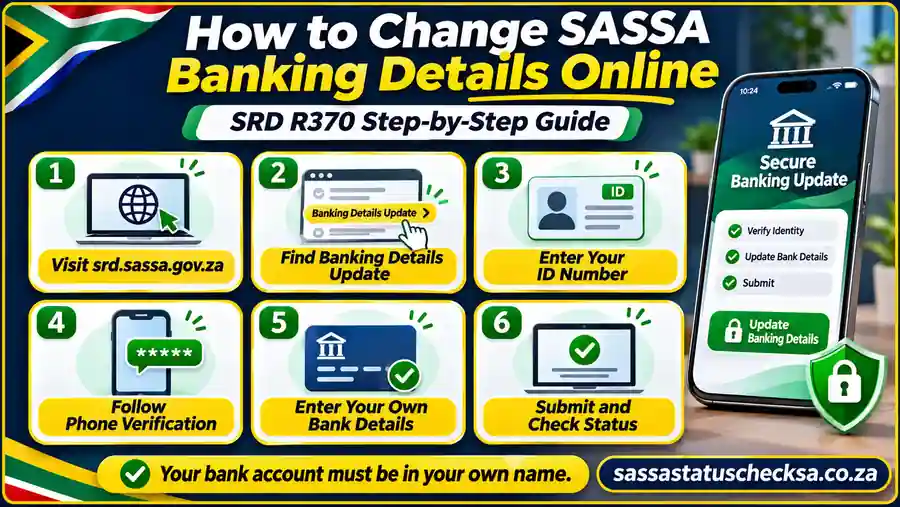
To change SASSA banking details online for SRD R370, begin with the genuine government portal linked above. The exact sequence and labels can change, especially if SASSA asks for identity verification or sends a secure message. The six steps below explain the information and decisions you should be prepared for, not a promise that every applicant sees identical screens.
Make sure you are changing details for your own SRD record. Do not pay an agent to submit the form, disclose an SMS code to another person or enter financial information into a lookalike page. A genuine update concerns the payment instructions associated with your grant—not a new paid registration or a guaranteed release of funds.
Open the Genuine SRD Banking Update Service
- Open the government SRD website.
Type srd.sassa.gov.za directly into your browser, or use the single banking-update button above. Check the complete address before entering any information. If the portal is temporarily unavailable, retry the government entry point later instead of following unsolicited messages from social media.
- Find the applicable banking or payment-details option.
Choose the section meant for your applicant type and locate the current bank-update or payment-method instructions. South African ID holders and qualifying permit or asylum-seeker applicants may be directed through different identification routes. Use the instructions actually displayed; an older tutorial's menu labels may no longer match.
Enter and Verify Your Own Applicant Details
- Provide the identification details requested.
For the South African ID route, this usually means your own 13-digit ID number. Follow any different instructions shown for an eligible permit or file-number route. Use the contact details already associated with your SRD record; incorrect or inaccessible cellphone information may prevent you from completing verification.
- Complete the secure verification instruction.
SASSA may send an SMS PIN, a secure instruction link or a request for identity verification, depending on your circumstances and the service currently in use. Read the live message carefully and complete the required step through the authentic government process. Never share an OTP or banking PIN. Not every applicant will see an identical SMS or facial-verification sequence.
Provide, Review and Submit Your New Payment Information
- Enter your own bank account information.
Where the official service requests it, provide the bank name, account number, account type and any required branch code or payment-choice details. Check the digits against your bank's records. The account should be active, capable of receiving the relevant payment and registered in your own name, matching your SASSA identification details.
- Review, submit and check the next instruction.
Recheck your account number, name and any confirmation shown before submitting. Save a reference or confirmation privately if the system provides one, and complete any subsequent authentic verification request. If the screen closes without confirmation, check the existing record or government instruction before submitting the same change repeatedly. A submitted request is not yet proof that the new account passed verification.
If you no longer have access to your registered cellphone, do not use another person's SIM as a workaround. The next sections will cover phone recovery, OTP problems, biometric verification, accepted account information and the difference between a pending banking check and a missed payment.
What You Need Before Updating Your Banking Details
Before you start a SASSA banking details update, gather the details that identify your grant record and the account you want SASSA to use. Having the correct information ready helps you avoid a request being rejected because of a mistyped number, an old cellphone or a bank account that cannot be matched to the beneficiary.
The preparation differs depending on whether you are changing payment information for the SRD R370 grant online or requesting a payment-method change for another social grant. You do not need to send copies of personal documents to this website. Only provide sensitive information through the authentic government process when it specifically asks for it.
Your ID, Registered Cellphone and Current Payment Method
For the South African ID-holder route, have your own 13-digit ID number available. The SRD service also supports certain asylum seekers and special-permit holders, who should choose the identification route shown for their category rather than typing an invented 13-digit number. Use the same personal information connected with your existing application.
Check that the cellphone number recorded for your grant is active and under your control. SASSA uses this number for application messages and, when required, verification instructions. The number on your phone today may not be the number stored on an older SRD application; if you changed SIM cards, confirm your registered details before repeatedly requesting a code.
It is also useful to know whether the current payment destination is a bank account, an older payment preference or a method that SASSA has asked you to update. You do not need to publish your current account number or disclose a banking PIN to identify the problem. If you are updating a closed account, keep a private note of when it was closed and whether a payment was already expected; those details can help with later enquiries.
Bank Account Name, Account Number, Branch Code and Account Type
Have the new account details exactly as your bank records them. The information SASSA requests can include the bank name, account number, branch code and account type, such as savings or current. Some banks use a universal branch code; others may use a different format. Copy the information from your banking app, a recent account confirmation or a bank-issued document instead of guessing.
The account must belong to the grant beneficiary. SASSA has warned that SRD banking information that does not belong to the applicant will not verify for payment. A spouse's or friend's account is not a workaround. For regular social grants, a bank-payment consent form also requires the beneficiary to confirm account ownership. The exact handling of a child's grant or lawful representative should be checked through the applicable SASSA procedure rather than treated as permission to enter any relative's account.
Double-check the account holder's name as registered with your bank. Differences in spelling or identity records can complicate matching, even if the account itself is open. Also confirm that the account can receive electronic deposits and has not been frozen or closed. The bank and payment-method questions are covered in more detail in Section 6.
Documents for SRD Updates vs Other Grant Changes
The usual SRD journey is electronic: applicants enter identifying and banking information in the government service and complete whatever verification it requests. Do not assume every applicant must upload an ID scan, bank statement or selfie simply because a competitor lists these as mandatory. If the current verified SASSA service gives a specific document or identity-check instruction, follow that instruction securely.
For an office-assisted change to a regular grant, expect an identity check and confirm the supporting documents before visiting. SASSA's 2026 grant booklet calls for a recent three-month bank statement showing the beneficiary's name and account number when banking details are updated. Its grant-specific lists also mention a bank-account confirmation letter or three months of statements. Ask the relevant SASSA office which bank evidence it accepts for your case. Other proof, such as representation or caregiver documents, may be requested where relevant; it is not a universal checklist for every beneficiary.
SRD R370 — online preparation
- Your valid SA ID or the accepted identification details for your applicant category
- Access to the cellphone number registered on your SRD application
- Correct bank name, account number, account type and branch code if required
- Time to complete any identity or SMS verification the genuine portal requests
- A private way to save an on-screen confirmation or reference, if provided
Other social grants — office preparation
- Identification document and details of the social grant concerned
- A recent three-month bank statement showing your name and account number, or a bank-account confirmation letter where SASSA accepts it
- Any existing SASSA payment card or related record, if relevant to the change
- Representative, caregiver or address evidence only if requested for your case
- Any current appointment instructions or document list confirmed by the office
These are preparation lists, not an instruction to upload documents here. Office requirements and electronic prompts can change, so confirm the specific requirements for your grant before travelling or submitting information.
SASSA OTP, SMS Links and Facial Biometric Verification (eKYC)
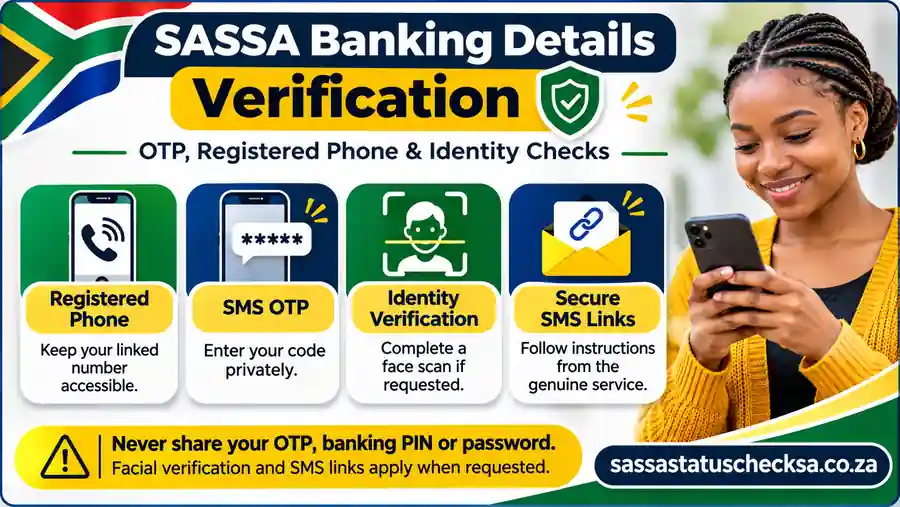
SASSA uses identity checks to help ensure that SRD grant and payment records belong to the correct person. Depending on the action you are taking, the government service may ask for an SMS one-time PIN (OTP), send a verification link, or direct you to a facial biometric identity check. This does not mean every person who changes banking details will receive the same message or be asked for a face scan.
When you change SASSA banking details, do not mistake an OTP for a payment reference or a promise of approval. A verification step establishes access or identity; a separate check may still be needed before new bank information can be used for payment. These are also different from the monthly SRD eligibility result.
What to Do If Your OTP Does Not Arrive
Start with the basics: is the SIM with the number registered for SRD in your phone, active and able to receive ordinary SMS messages? Check network reception, blocked-message settings and whether you accidentally entered a different number. If the government screen offers a resend option, use it in accordance with the on-screen instructions and allow time for the message to arrive.
If nothing arrives, do not repeatedly begin new banking-update requests or give another person your ID and cellphone details to “try on their phone”. The service may be using an old number, an identity check may be outstanding, or the message may be delayed. Check the actual error wording and follow the government's recovery route for the registered number.
When SASSA May Require Facial Identity Verification
Facial identity verification, sometimes called eKYC or biometric verification, can be used when SASSA needs to confirm the person behind an SRD record. Government announcements specifically describe beneficiaries receiving an identity-verification status, with concerns including suspected fraud or incorrect contact or banking information. Some phone-number recovery and other high-risk account changes may also involve additional identity checks.
If the authentic service asks you to complete a face or liveness check, follow its directions carefully. Use good lighting, keep your face visible and make sure you are completing the verification for your own application. Do not send a selfie to an unofficial WhatsApp contact, and do not allow an unfamiliar person to capture your face or identity documents under the pretence of guaranteeing payment.
Not everyone has a smartphone, camera or enough data for this process. SASSA announced in January 2026 that local offices can assist SRD beneficiaries with biometric verification using agency equipment. If you cannot complete a required check yourself, contact SASSA or enquire at your nearest office about assistance rather than paying a stranger for a supposed shortcut.
Lost Your Registered Phone or Need to Update the Number?
If your old phone or SIM is lost, your number has changed, or another person controls the number associated with your SRD record, resolve that access issue first. Otherwise, an OTP or secure link can be delivered to a number you cannot use, preventing you from completing the banking update.
Begin at the government SRD portal and look for the current contact-details or cellphone-change procedure that applies to your applicant type. You may be asked for identification details and additional verification. Enter a new number that you personally control, verify it through the process SASSA provides, and only then return to the bank-update steps. Do not assume entering a different number on a banking screen automatically replaces the number held against your original application.
If the available instructions do not let you regain access, contact SASSA on 0800 60 10 11 during its published working hours or request assistance at a local office. Keep notes of the error and your selected applicant category. Staff may explain a recovery or identity-verification step, but no one should promise to bypass security or release a grant merely because you pay a fee.
How to Recognise and Safely Use a Genuine SMS Verification Link
A genuine SASSA identity process may send a link by SMS; therefore, a blanket claim that SASSA never sends links is misleading. The safe approach is to start from the government SRD service yourself and complete only a verification request that corresponds to an action or message you can independently confirm.
Read the complete destination address before entering details. A link that merely contains the word “SASSA” or ends with a familiar-looking set of letters is not proof of legitimacy. Look out for spelling changes, extra characters, shortened links, requests for payment and messages pressuring you to share your bank PIN or OTP with another person. If you were not expecting a link, verify the request through the government entry point or SASSA's published contact channel instead of opening it immediately.
If the authentic service gives you a time-limited identity check, complete it within the period stated in that particular notice. An expired or interrupted verification can require you to request fresh instructions. It does not, by itself, mean you have been permanently declined for SRD or that another person is entitled to submit the banking change for you.
Which verification problem do you have?
Check registered SIM and official resend or recovery instructions.
Complete the government contact-update and identity process first.
Follow the authentic eKYC instructions or ask SASSA for assisted verification.
Do not enter details. Independently confirm the request with SASSA.
Once your identity or contact details have been verified, return to the relevant banking update and check whether the new payment information has been accepted. A successful OTP or facial check is one step in the process; Section 7 will explain the difference between a submitted bank change, bank details pending and an actual payment.
How to Change Banking Details for Other SASSA Social Grants
If you receive a regular social grant rather than the SRD R370 grant, do not assume the SRD website can update your payment destination. For the Older Persons, Disability, Child Support, Foster Child, Care Dependency or War Veterans grant, the usual route for a change of bank account or payment method is to request assistance through SASSA. If you also receive Grant-in-Aid, explain which grant payment you want to change so the relevant records can be handled correctly.
When you change SASSA banking details for a regular grant, the aim is to redirect an existing grant payment to an approved destination. You are not reapplying for the grant, appealing an eligibility decision or replacing a damaged card merely by submitting a new account number. The staff member should be able to explain which payment-change procedure and documents apply to your case.
Prepare the Documents for an Office-Assisted Change
Gather proof of identity and reliable evidence of the account that should receive the money. SASSA has previously instructed beneficiaries changing an ordinary grant's payment option to bring their identification document and proof of residence, plus a bank statement or bank confirmation letter if moving to a bank account. The agency's 2026 grant information also refers to recent bank statements when banking details are updated. Confirm what your office currently accepts before visiting, particularly if you use a representative or receive a grant on behalf of a child.
| Document or information | Why it may be needed | What to check |
|---|---|---|
| Valid identification | Allows SASSA to match the payment-change request to the relevant person or authorised payee. | Bring your valid ID or other identification SASSA has instructed you to use. |
| Bank proof | Shows the name and account number for the intended bank payment. | Ask whether a recent three-month statement or bank-issued confirmation letter is required for your grant. |
| Proof of residence | May be requested in an office-assisted payment-method change or when the beneficiary's details need updating. | Confirm accepted documents and whether your address is still current. |
| Grant or payment information | Helps identify the current grant, payee and destination. | Have your grant type and any relevant card or reference available; never disclose its PIN. |
| Authority to act for someone else | Special arrangements may apply to an authorised procurator, caregiver or representative. | Ask SASSA what evidence of authority is needed; do not assume a family relationship alone is sufficient. |
This table is a preparation guide, not a fixed document requirement for every grant or person. An eligibility review and a payment-details change are different procedures; the office may give a more specific list.
For a Child Support Grant, the person recognised by SASSA as the caregiver or payee matters. It is not safe to assume that the child must personally own the account or that any adult relative can nominate an account. If circumstances have changed—for example, the responsible caregiver has changed—tell SASSA before treating the matter as a simple bank update.
Request and Confirm the New Payment Method at SASSA
These five practical steps explain an office-assisted SASSA change of banking details. The exact form names, identity checks and processing sequence depend on the grant and the SASSA office. You should follow the instructions given for your own case instead of relying on an online guide's claim that a particular desk or form always exists.
- Confirm the correct office process.
Call SASSA on 0800 60 10 11 or contact a local office to ask about changing the payment destination for your particular grant. Check whether you need an appointment and which identity, bank and representative documents to bring. Do not assume another town's office hours apply to yours.
- Visit with the required evidence.
Bring the documents that apply to you, including appropriate account proof if you want a bank transfer. Use the bank account of the beneficiary or authorised payee accepted under SASSA's rules. If you cannot attend because of illness or limited mobility, ask SASSA about an authorised representative or other accommodation; do not send a stranger with your card and PIN.
- Request the change to your payment destination.
Explain whether you are moving from one bank to another, from an existing card arrangement to a personal account, or to another option SASSA currently permits. Staff may ask you to complete or consent to a bank-payment form and may verify your identity and account ownership.
- Review the information before it is accepted.
Check the account holder's name, bank, account number and branch or account-type information shown on the form. Ask for any acknowledgement or reference available and keep it privately. A receipt or accepted form does not always mean the new payment route is active for a payment already being processed.
- Confirm the effective payment arrangement.
Ask when the changed details are expected to apply and how to check their status. If the next grant payment is approaching, confirm which account or payment channel is currently recorded rather than assuming an immediate switch. Follow up with SASSA if your confirmation and actual payment do not match.
How to Follow Up on a Regular-Grant Payment Update
Once you have submitted the change, keep a private record of the date, the grant involved and any reference or instructions you received. If SASSA provided an expected effective period, use that information when asking about the next payment. Older official announcements described particular cutoff-day arrangements, but those historical examples should not be treated as guaranteed 2026 processing rules for every case.
If a payment appears in the old account after you requested a change, first establish whether the instruction had been verified and was active before that payment was processed. If the old account is closed or the payment was returned, report the facts to SASSA and ask how the payment will be traced or reissued. Do not keep submitting new bank details on the assumption that repeated changes will release an outstanding payment more quickly.
For a payment-card access problem, identify whether the card belongs to Postbank or another bank before contacting the correct issuer. For a missed grant payment or unclear SASSA record, use the published SASSA helpline. Never share your card PIN, CVV, banking password or an SMS verification code with anyone offering to speed up the change.
Which Bank Accounts and Payment Methods Can Receive SASSA Grants?
When updating SASSA banking details, the most useful question is whether the account or payment channel is eligible for your grant and your identity record, not simply whether a bank is familiar. SRD R370 payments have their own verification process; regular social grants may use a personal bank account or an approved provider and card arrangement. The payment method available to you depends on the current SASSA rules and options shown for your case.
A correctly submitted request is not automatically a verified account. Check your account holder details and follow SASSA's confirmation instructions before expecting a deposit. An approval for a particular SRD month and acceptance of banking details are separate checks, so changing one does not guarantee the other.
Bank Account in Your Own Name: Main Verification Rule
For SRD R370, SASSA has expressly warned that bank details which do not belong to the applicant will not pass payment verification. An active account in your own name is therefore central to an SRD banking details update. For ordinary grants, the account-holder or recognised payee must also comply with SASSA's consent and payment requirements. Special payment arrangements for an authorised caregiver, procurator or institution must be handled through the proper agency procedure rather than guessed from general SRD instructions.
The name and identity details must be consistent with the beneficiary or the payee accepted for that grant.
The account should not be closed, suspended or otherwise unable to receive incoming deposits.
Copy the account number, account type and branch information exactly as the bank supplies them.
Check that the account or method can receive the payment type offered through SASSA for your grant.
An account owned by a spouse, friend or neighbour is not a safe workaround for an applicant whose account is still unverified. A joint account, business account or another unusual arrangement may need specific eligibility guidance rather than an assumption that any account with the right number will work. If your banking app shows several account identifiers, ask the bank which details are used for normal electronic deposits.
Supported Banks: How to Check Your Account's Eligibility
Many South Africans use mainstream banks such as Capitec, FNB, ABSA, Nedbank, Standard Bank and TymeBank. These are examples people commonly ask about—not a SASSA-issued, exhaustive list of approved banks, and not a promise that every account product with one of these names can receive every grant payment. Verification depends on the actual account, its ownership and the payment route currently accepted by SASSA.
Before you change your SASSA bank account, check with your own bank that the account can receive ordinary electronic credits, that you copied the correct account number rather than your card number, and that the bank's records correctly reflect your name and identification. A debit-card number, loyalty-card number or cellphone wallet number is not automatically a valid bank-account number for EFT.
| Question | What to confirm | Why it matters |
|---|---|---|
| Is it my bank account? | Account holder name and beneficiary/payee identity | An ownership mismatch can prevent verification. |
| Can it accept deposits? | Account is active and supports the transfer involved | A closed or restricted account may not receive payment. |
| Are the numbers correct? | Account number, branch code and type as shown by the bank | Guessing or confusing a card number with an account number creates avoidable errors. |
| Is this method offered for my grant? | Current SASSA payment choices for your grant and applicant category | SRD online options and regular-grant arrangements are not identical. |
Bank names here are illustrative, not endorsements and not a guaranteed compatibility directory. If a particular account keeps failing verification, ask the bank to confirm the account details and ask SASSA which error is recorded before resubmitting.
What If You Do Not Have a Bank Account?
Having no bank account is not the same as being ineligible for a grant. SASSA has historically offered certain unbanked SRD applicants nonbank payment channels, including mobile-money or cash-send arrangements. However, an older list of payment methods is not proof that a specific retailer, collection code or cash-send service remains available to every SRD R370 applicant in 2026.
Start with the current options displayed for your applicant category in the genuine SRD service. If a nonbank method is offered, read the exact identification, phone ownership and collection instructions shown for that option. If no appropriate alternative appears, contact SASSA on 0800 60 10 11 and ask what arrangements currently apply to your circumstances. You should not enter another person's bank account merely because you lack one yourself.
For regular social grants, a beneficiary may be paid through an approved payment service arrangement or an account rather than having to open a particular commercial-bank product. Some beneficiaries access money at participating retailers or ATMs through their existing card; that is a way to access funds already paid into an account, not necessarily a separate method for submitting new SRD banking details.
Postbank Black Card vs SRD R370 Banking Details
A Postbank Black Card is connected with the transition from older SASSA Gold Cards used by many regular social-grant beneficiaries. In August 2026, Postbank reported that card migration was continuing through selected retail locations and that help would remain available after its announced 31 August deadline. That card-replacement programme should not be described as an automatic SRD R370 banking-update step.
If you currently receive a regular grant through a Postbank card, find out whether your problem is a lost card, a PIN or ATM transaction, card replacement, or a request to move the grant to a different bank. A card-service problem is generally directed to Postbank; a change in SASSA's recorded payment destination may involve SASSA's regular-grant procedure. For Postbank card assistance, the published customer line is 0800 5354 55. Do not give a card PIN to anyone claiming to organise migration.
Postbank has identified selected retailers—including Shoprite, Checkers, Usave, Pick n Pay, Boxer and Spar—as sites for parts of its card-replacement programme. Those locations are not a universal list of SRD cash-collection outlets and do not establish that every branch offers the same service. Confirm the current site and required identity document through Postbank if your query is specifically about a Black Card.
If your SRD R370 payment information is missing or waiting for bank verification, return to the SRD banking-update route explained earlier in this guide. If the issue is a payment that has not yet arrived, the next section will explain bank details pending, account verification and why an approved month still may not show a payday.
Bank Details Pending: What It Means and How Long Updates Take
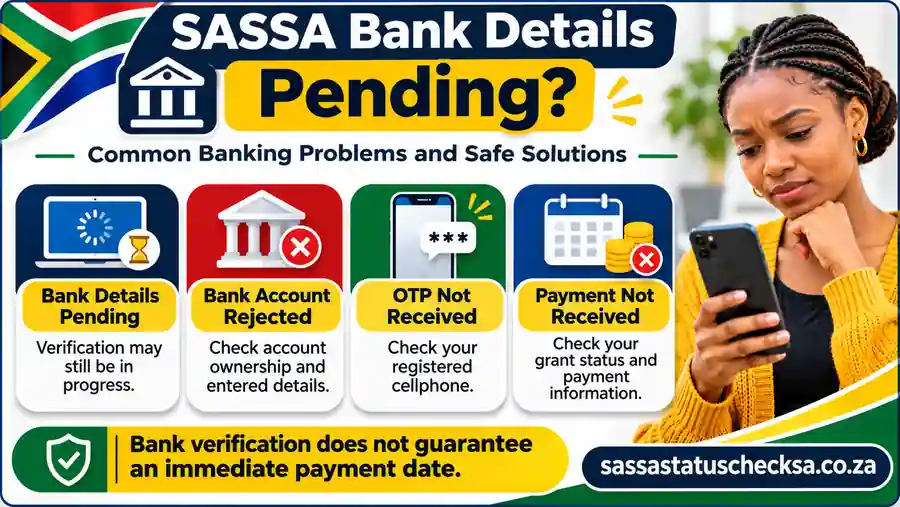
Seeing Bank Details Pending when you check an SRD R370 record can be frustrating, particularly if SASSA has already approved a grant month. It is important to distinguish an incomplete payment-method record, a banking-verification step and the separate decision about whether you qualify for a particular month. These are related, but they are not interchangeable. A bank update does not turn a declined application into an approved one, and an approved grant month does not mean a transfer has already been sent.
SASSA checks banking information so that an eligible payment can reach the right person. The exact words on the government service can change, so use the description shown for your individual record. If your details have only just been submitted, allow the requested validation to take place. If the account information is wrong, if a verification request has not been completed or if a payment has not appeared when expected, the next action is different.
Bank Details Pending vs Approved but Not Paid
Bank details pending commonly points to a payment-information problem or an account that still needs to be submitted or verified. SRD application pending, however, may indicate that the eligibility assessment for a particular month is unfinished. An approved monthly result means eligibility was accepted for that period; it does not itself show that the bank transfer has been completed. Do not interpret these labels as a sequence that every beneficiary must pass through.
| What you see | What it may mean | Sensible next action |
|---|---|---|
| Bank details missing / pending | The payment method has not been supplied, confirmed or fully verified. | Follow the banking instructions for your own SRD record; check whether another secure verification action is outstanding. |
| Bank verification in progress | Account-holder or payment information may still be under validation. | Make sure your own details are accurate and avoid sending repeated changes while the request is being processed. |
| Monthly SRD status pending | Eligibility checks for the selected assessment month may not be complete. | Check that particular month; do not assume changing banks will accelerate an eligibility decision. |
| Monthly SRD status approved, no payday | The grant month may be approved while payment scheduling, verification or other processing remains outstanding. | Review the individual monthly result and any instructions; do not assume a fixed pay date. |
| Payment marked as sent, but not received | The transfer may be processing, credited to a different previously verified account, returned or otherwise unresolved. | Check with the bank and SASSA using the correct month and available transaction or reference details. |
The table gives practical interpretations, not a list of exact status labels guaranteed to appear on every version of the SRD portal. Always follow the specific result and instructions in your authenticated government record.
Why Verification or the Next Payment Run May Take Time
When you change SASSA banking details, the agency may need to confirm that the account belongs to you and can accept the payment. The bank's records, account status and required identity checks can affect the result. SASSA has publicly said that verified SRD banking details are used for the next pay run; it has not established a universal promise that every update will be completed within five or seven working days. The time you submit the change, whether verification succeeds and when a particular grant month becomes payable all matter.
If you update details near a payment run, the new destination may not be available for that run. That does not automatically mean the update was rejected. It also does not mean an older account will always receive the payment: the actual outcome must be checked rather than guessed. Keep track of when the change was submitted, when any verification was completed and which SRD month you are checking.
The government service has received the information you entered. Further validation may be required.
The account or payment choice has passed the relevant checks. This alone is not a payday.
Payment depends on the approved month and the available run or individual scheduling information.
Regular social grants have published monthly payment calendars, while SRD R370 payments do not have one fixed payment date for every approved person. Our SASSA payment dates guide explains that distinction and the regular-grant calendar. Use the personal status or payday information from SASSA for a specific SRD month instead of relying on another beneficiary's deposit date.
Repeatedly changing a correct bank account can trigger more checks and slow resolution. SASSA has warned that frequent changes to banking and contact details can delay payment. Make a genuine correction when necessary, then check for an acknowledgement or required verification action rather than resubmitting the same details each day.
How to Check Whether Your New Bank Details Were Accepted
Start at the government SRD portal already linked at the top of this guide. Follow the current option for your applicant category and check any banking-update or payment-detail message available to you. Some screens may show a confirmation or a next step without displaying a full account number. Do not assume the site will always provide a separate public tool that says “bank verified” or displays a bank account in full.
- Check what you submitted. Compare your private bank records with the new account number, type and identity information you intended to provide. Never post those numbers publicly.
- Look for an acknowledged request or outstanding instruction. Check the authenticated government screen and any message you expected on your registered cellphone. Complete verification only through a route you can independently confirm belongs to SASSA.
- Check the correct grant month. Distinguish account verification from monthly approval, a recorded payday and an actual bank deposit.
- Follow up when there is a concrete problem. If the portal reports an error, shows a persistent mismatch or an expected payment has not arrived, contact SASSA on 0800 60 10 11. Explain the month, update date and error wording, without sending PINs or passwords.
For a regular social grant, the office that processed the request or SASSA's support staff can explain how to confirm the recorded payment destination. If the change was made by an authorised caregiver or representative, the agency may need to verify that person's authority as well as the bank details. Never pay a third party to “release” a payment or guarantee that a pending status will disappear.
Common SASSA Banking Details Problems and How to Fix Them
Most SASSA banking details problems are easier to handle when you identify the actual fault before trying again. An ownership mismatch, a closed account, a missing SMS, a pending monthly decision and an unsuccessful transfer are five different situations. Changing banks repeatedly is rarely the right response to all of them.
Use the following guide to work out which record to check and who can resolve it. The descriptions are general troubleshooting advice; they do not allow this website to inspect your grant, see your bank account or confirm a payment. Enter identity and financial details only in an authenticated government or banking service, never in a comment box or a message to an unofficial helper.
Bank Details Rejected or Account Holder Does Not Match
One of the most important SRD R370 banking rules is that the account must belong to the applicant. SASSA has confirmed that banking details in another person's name will not pass verification. An incorrect account number, wrong account type, name mismatch or a closed or restricted account can also prevent a successful update. If the government's message does not identify the specific cause, do not assume you know which field failed.
Check the account information directly with your bank. Confirm that the product can receive the relevant electronic deposit, that the name and identity details on the account are correct, and that you entered the bank account number rather than the number printed on the payment card. Then follow the genuine SASSA correction instructions. Do not use a family member's account, invent a name or change the bank's information to conceal who owns the account.
Payment Sent to an Old or Closed Bank Account
If you updated your bank information but money appears to have gone to an old account, establish the payment month and timing first. The banking-update request may have been submitted after a payment was scheduled, or its verification may not have been completed when that run took place. Equally, the payment may not have been sent at all. Avoid treating the absence of money in the new account as proof that it was deposited into the old one.
For an account you still control, inspect its transaction history and ask the bank whether an incoming SASSA credit was received. For a closed account, ask the bank whether the transfer was rejected or returned; banks handle closed-account credits according to their own payment processes. Then explain the facts to SASSA, including the exact SRD month and any payment reference available. Neither a rejected transfer nor a bank change guarantees an automatic same-day reissue or a fixed date for the money to arrive.
If the account you once used belongs to another person, do not ask that person to forward an OTP or give you account access. Tell SASSA which destination you are disputing and follow its identity and payment-verification procedure. For a regular social grant, speak to the office or recognised service responsible for that payment arrangement.
OTP, Portal and Verification Problems
When an SMS one-time PIN does not arrive, check that the registered cellphone number is still yours and able to receive messages. Also check signal, SMS storage and the service's legitimate resend or retry option if available. If the SIM is lost or your number has changed, first use SASSA's authorised contact-update or identity-verification route. Entering an unrelated person's number is not a safe shortcut.
Some SRD cases require additional biometric or identity verification. SASSA has stated that beneficiaries without a suitable smartphone, data or computer can approach a local SASSA office for help with that verification. If you receive a secure SMS instruction, independently establish that it came from the authentic SASSA process before opening it. Certain identity-verification links have a documented 72-hour window; that is not proof that every ordinary banking-details SMS expires after exactly 72 hours.
If the government site times out, do not assume your banking change failed or succeeded. Look for an existing acknowledgement or the latest status before starting again. Save the time and error wording privately, try the authentic portal later and ask SASSA for assistance if the error persists. No legitimate troubleshooting requires you to give someone your banking PIN, card PIN, password or one-time code.
Changing Details Too Frequently Can Delay Processing
When a payment is late, it can be tempting to submit the same account over and over or switch between banks. SASSA has specifically cautioned that frequent banking-detail and cellphone changes can cause delays. Each new or corrected record may need checks; changing a valid account solely to make a pending message disappear can create another issue rather than speed up an existing payment.
Make an update if the account is actually wrong, compromised, inaccessible or closed, or if SASSA instructs you to correct it. Otherwise, keep your confirmation and check whether the existing request is waiting for verification or a pay run. If you have already tried multiple changes, tell SASSA which account information should currently be considered authoritative and ask about the next legitimate step.
If the real issue is an SRD month marked declined instead of a bank-account verification problem, changing accounts will not reverse that decision. Our SASSA appeal guide explains when a month-specific challenge may be appropriate.
| Problem | Check first | Next practical action |
|---|---|---|
| Bank account fails verification | Account holder name, ID, account number and account status | Confirm with the bank; correct the actual mismatch in the government service. |
| Bank details still pending | Submission acknowledgement and any outstanding verification | Complete authentic checks; avoid unnecessary duplicate updates. |
| Monthly SRD result is pending or declined | Specific month and stated eligibility reason | Use the correct status or appeal process; banking changes do not decide eligibility. |
| Payment missing after approval | Recorded individual payday, bank transactions and outstanding checks | Ask the bank and SASSA about that payment; do not assume a universal SRD payday. |
| Old or closed account may have been paid | Transfer timing, original account records and any returned-payment notice | Ask the bank what happened and contact SASSA about the specific month. |
| Registered cellphone unavailable | Whether you can still receive SMS on the original number | Follow SASSA's official phone or identity recovery instructions first. |
| Portal error or no OTP | Correct government address, network, active SIM and saved acknowledgement | Use the authentic retry route or request SASSA assistance; never share an OTP. |
| Account changed without your consent | Evidence of unusual messages, unauthorised account or bank activity | Contact SASSA and your bank promptly; the next section covers fraud response in detail. |
Keep a private record of what you changed, when you changed it, the month involved, any legitimate reference number and what SASSA or your bank said. Share only the information necessary through their verified channels. The next section explains how to respond if a banking-details change may have been fraudulent.
How to Protect Your Grant From Banking Details Fraud
A request to change SASSA banking details should come from you or a person formally authorised to act in the relevant grant process. Scammers may impersonate officials, advertise a faster R370 payment, or send a convincing banking-update message that asks for a one-time PIN. If a payment destination changes without your consent, treat it as a possible security incident rather than simply filling in the bank form again.
There are two priorities: protect any account or cellphone access that may have been compromised, and make sure SASSA knows the details of the suspected unauthorised change. You do not need to post a screenshot of your identity document or account statement in a public group to get help. The official SRD service is the place to complete an authenticated update; a general information website cannot see your record or reverse a payment.
Someone Changed My SASSA Banking Details Without Permission
You may notice an unfamiliar bank name, receive an unexpected verification message, or find that a previously recorded payment destination no longer matches your instructions. None of these signs proves fraud by itself: a genuine verification message or a processing error is also possible. But do not ignore a change you cannot explain, especially if your registered cellphone has stopped receiving calls or SMS messages.
Start by checking the information you can access through the genuine government SRD portal or a SASSA office. Make a private note of the date, the affected grant month, any message you received and what appears different. If you suspect that someone has access to your SIM, banking app or email, speak to your mobile network or bank about securing that access. Avoid following a link in the suspicious message to “undo” the problem; it could be another attempt to collect your credentials.
How to Report an Unauthorised Change or Suspected Scam
SASSA publishes 0800 60 10 11 as a grant enquiries and fraud-reporting number. Use it to explain that a banking or cellphone change appears unauthorised. Where practical, visit a SASSA office with your own identification and ask how to secure the grant record and verify the lawful payment destination. A call or visit starts a report or enquiry; it does not guarantee an instant reversal or a particular re-payment date.
- Stop interacting with the suspicious contact. Do not share more information, reply with an OTP, pay a “recovery fee” or use a link you have not independently confirmed.
- Contact SASSA through its published channels. Explain which grant is involved, when you noticed the issue and whether a payment was missed or the destination changed. Ask what identity verification or fraud-reporting action is required.
- Secure your bank and cellphone access. Ask the bank or mobile provider to investigate unauthorised activity, a potentially compromised account or a suspected SIM swap. Follow their security instructions.
- Keep evidence privately. Save the message, sender information, dates, any payment record and the reference provided by SASSA or the bank. Do not upload confidential records to a stranger's form.
- Consider a police report if a crime is suspected. If an account was used fraudulently or money was stolen, ask SASSA, the bank and the South African Police Service about the appropriate reporting process and reference numbers.
For suspected corruption involving public officials, the national anti-corruption line 0800 701 701 is another published reporting channel. It is not a shortcut for checking an individual SRD payday, and a complaint does not mean an affected grant month has automatically been approved or paid. Keep the distinction between your security report and your ordinary payment enquiry clear.
Safety Rules for OTPs, Links, Cards and Bank PINs
Not every SMS containing an instruction or link is fraudulent: real SASSA processes can involve verification messages. The safe rule is to independently verify the source and context. If you did not start a banking or identity update, do not act on an unexpected link simply because the sender name looks familiar. Type srd.sassa.gov.za yourself to begin an SRD banking change, or confirm the request through a published SASSA contact route.
Enter a one-time code only in the authenticated process you initiated. Do not read it aloud to a caller or send it through social media.
A card PIN, CVV or banking-app password is not the same as the bank account details needed for a legitimate deposit update.
Verify which service initiated the SMS, whether you actually requested the change, and the destination before entering personal data.
SRD online updates and regular-grant office-assisted changes are different. An unrelated WhatsApp form cannot replace either procedure.
SASSA has warned beneficiaries to be cautious about websites and social-media accounts asking for personal information. Watch for misspelled addresses, requests to send ID photos to a private number, charges to “unlock” a grant and promises of instant back-pay. You can request support without entrusting your payment credentials to a third party.
Frequently Asked Questions About SASSA Banking Details
These answers cover the practical decisions applicants most often face when updating banking information. The government service controls the actual available options and whether a particular account has passed verification; this guide cannot view your private application or payment record.
How do I change SASSA banking details for SRD R370 online?
Start at srd.sassa.gov.za, choose the route for your applicant category and follow the current banking or payment-details instructions. Be ready to verify your identity using the registered cellphone and any additional checks the genuine service requests. Enter an account that belongs to you, confirm the information and retain any acknowledgement. Submitting the change and passing bank verification are separate steps; a submission alone does not promise immediate payment.
Can I update SASSA banking details without going to an office?
For SRD R370, the banking-details management route is normally online through the government's SRD service. If you cannot complete required biometric or contact verification with your device, SASSA may assist at an office. For Older Persons, Disability, Child Support and other regular social grants, contact SASSA about the applicable office-assisted payment-change procedure rather than assuming the SRD page will update your grant. Bring the identification and bank evidence requested for that specific route.
How long does it take for new banking details to reflect?
There is no reliable universal number of working days for every SASSA banking update. The request may need identity and bank-account verification, and a payment that was already scheduled may be handled separately. SASSA has said that a verified applicant-owned account can receive an SRD grant from a subsequent payment run, but that is not a guaranteed individual date. Check the recorded status and the month concerned before contacting SASSA about a persistent problem.
Why does my SRD status say Bank Details Pending?
It commonly means payment information has not yet been provided, accepted or verified for the relevant record. It does not establish that your grant for every month has been approved. Check whether your account is in your name, whether verification is outstanding and what the official service actually instructs you to do. A monthly eligibility result, an individual payday and a bank deposit are separate events. Avoid repeatedly replacing correct account details just to clear the message.
Can SASSA pay my grant into someone else's bank account?
For an SRD R370 applicant choosing bank deposit, SASSA says the bank account must belong to the applicant; another person's details will not pass its payment verification. Regular grants can involve separately recognised payment arrangements or authorised representatives, but those are governed by SASSA's own processes and should not be assumed to apply to SRD. If you need help because you have no account or cannot manage a grant independently, ask SASSA which lawful option applies.
Can I use Capitec, FNB, ABSA, Nedbank or another bank?
What matters is whether the particular account is eligible, active, owned by the correct beneficiary and able to receive the payment method SASSA offers. Capitec, FNB, ABSA, Nedbank and other banks are familiar examples, not a guarantee that every account or wallet product will be accepted. Confirm your bank account number and deposit capability with the bank. If SASSA rejects the details, check the reason before switching accounts or assuming the bank itself is unsupported.
What should I do if I have no bank account?
Check the current payment choices offered for your grant and applicant category. SASSA has used certain nonbank or cash-transfer arrangements in the past, but an old cash-send or retailer list is not proof that it remains available to you in 2026. Ask SASSA on 0800 60 10 11 what options are currently permitted. Never enter a relative's bank account as a workaround for SRD ownership checks.
Why am I not receiving an SMS OTP or verification link?
First confirm that you still control the cellphone number registered to the application and that the SIM can receive ordinary messages. Use an authentic resend option if displayed. If the number was lost or changed, follow SASSA's contact-recovery and identity-verification instructions; repeatedly trying a different number on an unrelated website will not fix the underlying record. Some identity-verification SMS links have a time limit, but a 72-hour expiry is not a universal rule for all banking updates.
Do I need facial verification to change my bank account?
SASSA may require facial or biometric checks in specific situations, particularly when identity or contact access needs confirmation. Do not assume the same face-scan screen appears for every applicant or every banking change. Follow the instructions in the genuine SRD process. If you lack a suitable smartphone or connectivity to complete required biometric verification, SASSA has advised affected SRD beneficiaries to seek assistance at local offices rather than paying someone to perform the check for them.
What if my bank details changed without permission or my old account was paid?
These situations need different first checks. For an unauthorised change, contact SASSA promptly, secure any compromised bank or cellphone access and preserve evidence privately; report suspected crime through appropriate channels. For an old-account payment, ask your bank whether a credit arrived or was returned, then ask SASSA to trace the specific grant month and transfer. Neither a fraud report nor a returned payment guarantees an instant reversal or fixed re-payment date.